Building the Foundation for FBN Marketplace
Designing the seller and admin platform foundation that helped FBN move from first-party commerce toward a scalable marketplace model.
FBN historically operated as a first-party commerce platform, where products, pricing, and fulfillment were mostly managed internally. As the company expanded into Marketplace, it needed a new foundation: third-party sellers had to be onboarded, product catalogs had to be configured, pricing ownership had to be clarified, and internal teams needed tools that could scale beyond spreadsheets and engineering support.
As the lead product designer, I designed several connected Marketplace workstreams across Seller Portal, Seller Onboarding, Product Configuration, Product Catalog Management, and early Dashboard concepts. Together, these experiences created the foundation for sellers to participate in the FBN ecosystem while giving FBN admins the control needed to protect catalog quality, pricing logic, and marketplace operations.
Company: Farmers Business Network
My Role: Senior Product Designer / Design Lead
Timeline: 2025-2026
Team: PMs, Engineers, Business Stakeholders & CX
Responsibilities: Information architecture, workflow design, seller/admin permission modeling, product configuration, catalog management, onboarding flows, competitive research, design documentation, and engineering handoff.

The Challenge
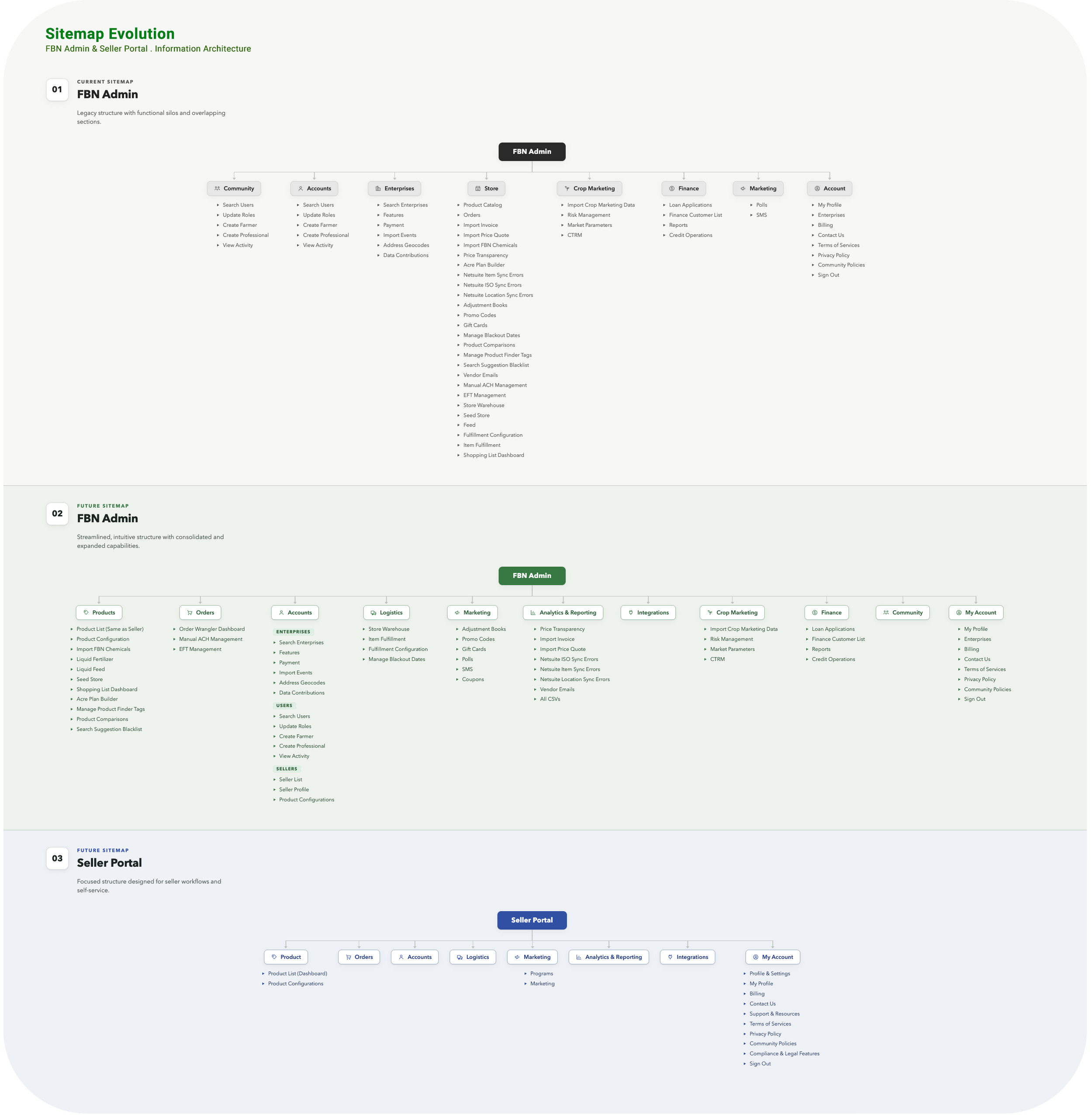
FBN already had an internal Admin Portal, but its information architecture was built around the existing first-party commerce model — not the future Marketplace vision.
As Marketplace became a strategic initiative, we needed to define how seller and admin workflows should work together at scale:
How should seller information be organized?
Who should manage product and pricing data?
What should sellers be able to edit?
What should FBN continue to control?
How could we support future capabilities like inventory, order management, logistics, and seller dashboards without overbuilding the MVP?
The challenge was not simply to give sellers a portal. It was to design the foundation for a new operating model — one that could support third-party sellers while preserving the catalog quality, pricing logic, and operational control FBN needed to run the marketplace
FBN could not scale Marketplace if every new seller, catalog change, product variant, or pricing update required manual coordination, spreadsheets, or engineering support.
Understanding the Problem
To design a scalable Marketplace foundation, I first needed to understand how FBN’s internal tools worked today and where the existing structure would not support future seller workflows.
I looked at the current Admin Portal, reviewed Marketplace requirements, and worked with product and engineering stakeholders to understand how seller data, product catalog data, pricing, and operational workflows were connected.
I also researched seller platforms like Amazon Seller Central, Shopify, Etsy, eBay, and Faire to understand how mature marketplaces organize seller workflows — from onboarding and product management to orders, analytics, account settings, and support.
The key insight was clear:
The existing Admin Portal reflected FBN’s current business model, while Marketplace required a structure designed for future growth.
This meant the Seller Portal could not simply be a smaller version of FBN Admin. It needed to be purpose-built around seller responsibilities, while still fitting into FBN’s broader marketplace operations
Users
Marketplace needed to support two primary user groups:
FBN Marketplace Admins: Internal users responsible for seller setup, product configuration, catalog quality, pricing logic, and operational control.
Sellers: Third-party partners who needed a focused way to manage their products, pricing inputs, availability, and account information without seeing the full complexity of FBN’s internal tools.
Farmers were not direct users of these tools, but they were impacted by the catalog and product configuration decisions behind the scenes.


From Marketplace IA to Product Experience
Once the Marketplace IA was defined, the next step was translating that structure into product experiences that sellers and FBN admins could actually use.
This was the starting point for the Marketplace platform, not the full end state. We began with the foundational areas needed to make Marketplace operational: Product Catalog Management, Seller Onboarding, and Product Configuration & Variants.
These early workstreams shaped how products were managed, how sellers were configured, and how catalog rules could scale across the marketplace. They also created the foundation for future capabilities such as Dashboard, Order Management, Logistics, Inventory, Warehouses, Analytics, Reporting, and more.
Product Catalog Management
Designing seller/admin workflows for managing products, pricing, availability, publishing states, and product details.
Seller Onboarding
Creating the admin-driven workflow for adding sellers, configuring business models, setting up fees, and managing access.
Product Configuration & Variants
Defining how FBN governs catalog structure, how sellers inherit or customize attributes, and how those rules shape the farmer-facing product experience.
Future Marketplace Capabilities
Laying the foundation for Dashboard, Order Management, Logistics, Inventory, Warehouses, Analytics & Reporting, and other seller platform capabilities.
Product Catalog Management
The first foundational experience we tackled was Product Catalog Management.
For Marketplace to work, sellers needed a way to manage the products they were bringing into FBN’s ecosystem, while FBN admins still needed visibility and control over catalog quality, pricing logic, and publishing rules.
This meant the experience had to support two sides of the same system:
Sellers needed a focused way to view products, update product information, manage availability, and understand publishing status.
FBN Admins needed broader visibility into seller product data, pricing inputs, catalog structure, and operational details that sellers should not fully control.
Product detail view showing seller-managed product information, variants, pricing inputs, and publishing states.
Product catalog flow showing product list management, CSV upload, and publishing actions.
Key design decision:
Give sellers enough control to work independently, without exposing the full complexity of FBN’s internal admin tools or compromising catalog quality.
Seller Onboarding
After Product Catalog Management, the next foundational area was Seller Onboarding.
Marketplace could not scale if every new seller had to be set up through spreadsheets, PM handoffs, and engineering support. FBN needed a structured internal workflow that allowed Marketplace admins to add sellers, configure business models, set up fees, and manage seller access.
The onboarding experience had to support a lot of operational detail without becoming overwhelming — including seller information, operating model, fee setup, activation, and user permissions.
Seller onboarding screens showing seller setup, operating model configuration, fee setup, and activation state.
Seller onboarding flow showing how FBN admins add a seller, complete required configuration, and activate access.
Key design decision:
Instead of forcing admins through a rigid multi-step wizard, I designed a save-friendly form structure that made the full setup visible, editable, and easier to return to over time.
Product Configuration & Variants
After Product Catalog Management and Seller Onboarding, the next challenge was defining how catalog structure should scale across the Marketplace. A marketplace catalog needs consistency. If every seller defines categories, attributes, and variants differently, the shopping experience becomes confusing for farmers and difficult for FBN to manage.
The core question was:
What should FBN control, and what should sellers be allowed to customize?
I designed the Product Configuration experience across both admin and user-facing surfaces. On the admin side, the work defined categories, subcategories, inherited attributes, required fields, visibility rules, and variant options across FBN Admin and Seller Admin views.
On the farmer-facing side, those configuration decisions shaped how product options appeared on the product detail page — including variant selectors, product attributes, unavailable states, and option groupings.
Product configuration connected the admin setup model to the farmer-facing product detail page, shaping how attributes, variants, and product options appeared in the shopping experience.
Product configuration flow showing how catalog rules are created, inherited, and applied across seller/admin experiences.
Key design decision:
FBN needed to keep the main catalog structure consistent, while giving sellers enough flexibility to manage their own products.
Laying the Groundwork for Future Capabilities
Product Catalog Management, Seller Onboarding, and Product Configuration were the first building blocks of the Marketplace platform, but they were not the full end state.
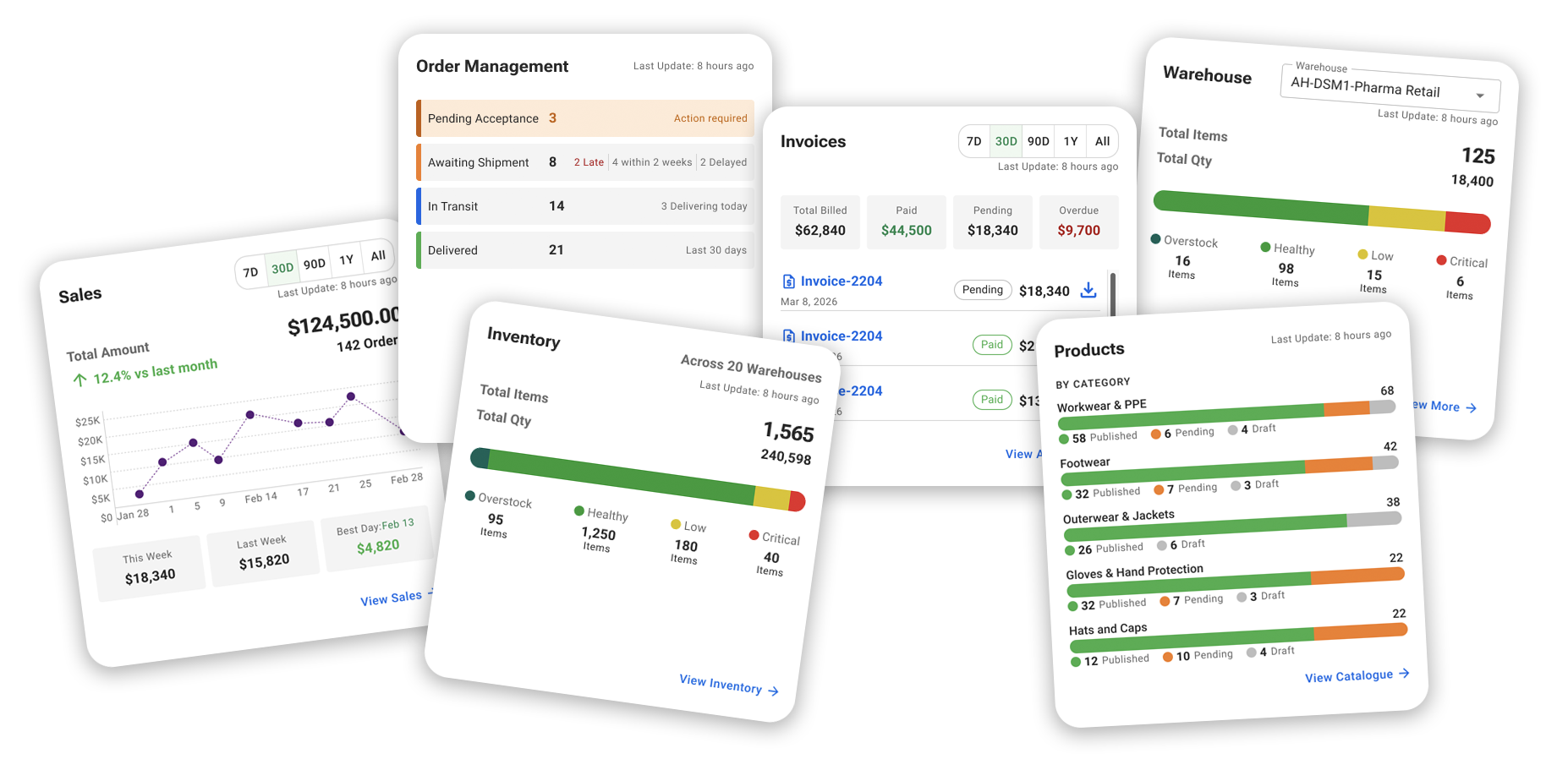
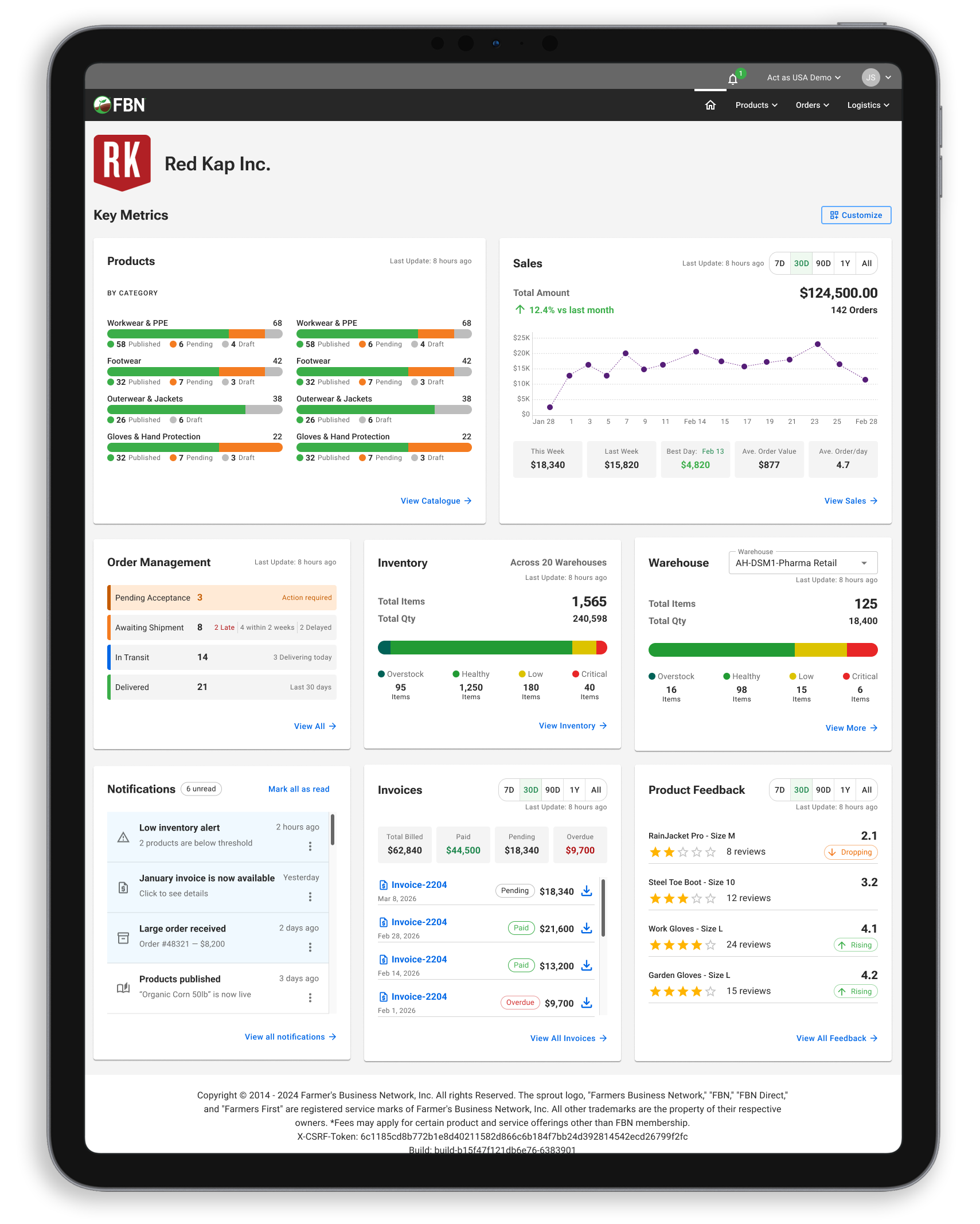
The broader Marketplace vision included future capabilities such as seller dashboards, order management, logistics, inventory, warehouses, analytics, reporting, seller profiles, and operational tools for both sellers and FBN admins.
As I designed the early foundation, I kept these future workflows in mind so the platform could grow without needing to be restructured later. The goal was to start with the most important operational needs, while creating an architecture that could support more advanced seller tools over time.